AIS Receiver via SDR on the Azul: Installation and Configuration with AIS-catcher
AIS Receiver via SDR on the Azul: Installation and Configuration with AIS-catcher
One of the advantages of having a mini-PC on board is that we can do things that are impossible — or prohibitively expensive — with a commercial chartplotter. Receiving AIS via software with a 25-euro RTL-SDR dongle is a perfect example.
On the Azul, we replaced the OpenPlotter dependency with a clean AIS-catcher installation directly on Debian, keeping the integration with SignalK and, therefore, with Freeboard-SK and the rest of the ecosystem. Here's how we did it.
The receiver: an SDR with TCXO
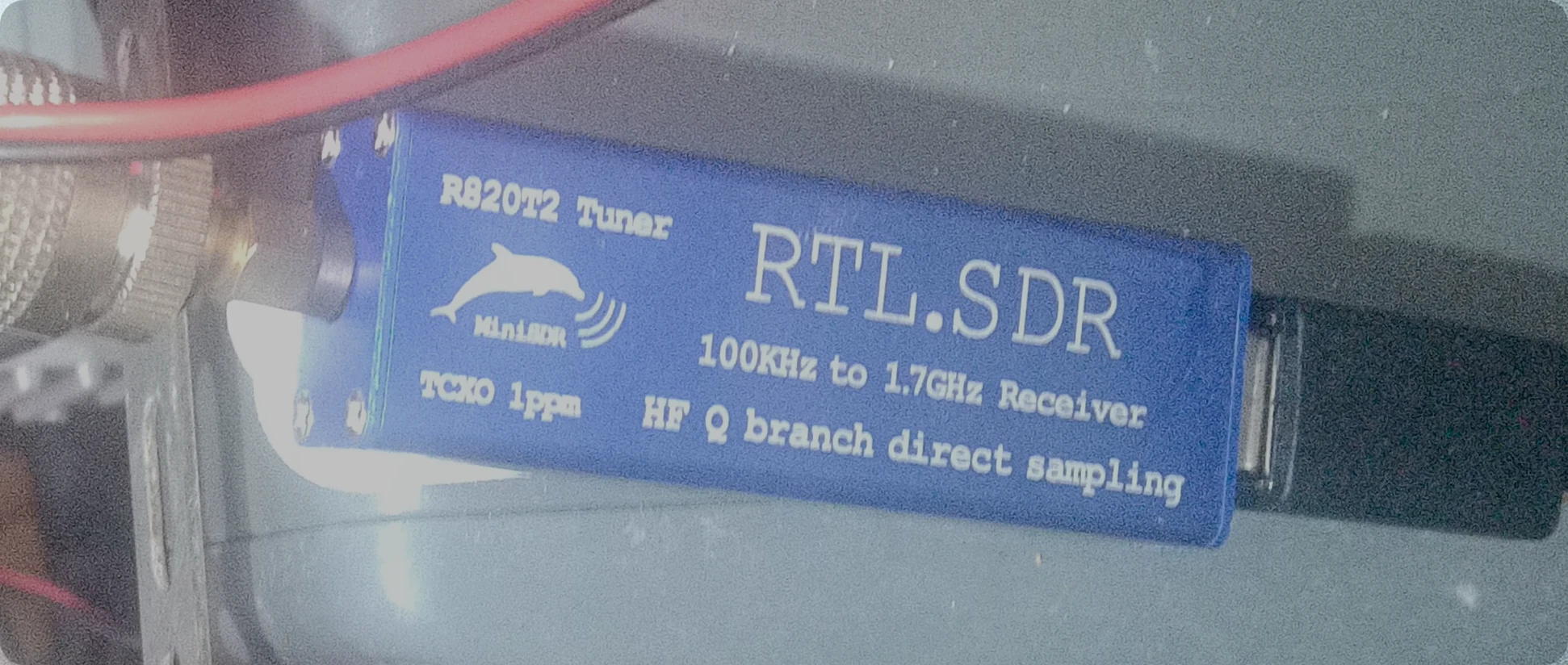
We use an SDR with the RTL2832U chipset and R820T2 tuner, with a 1 ppm TCXO oscillator (compared to the typical 20–100 ppm of cheap quartz crystals). Its coverage goes from 100 kHz to 1.7 GHz, with HF reception via direct sampling on the Q branch. Physically, it is housed in a blue case with a dolphin logo.
That particular unit (blue, with the dolphin) is no longer found online; it is a generic dongle from the full band family sold under various labels and brands. What matters is not the brand but the R820T2 + 1 ppm TCXO combo. The reference design for this class of device is the RTL-SDR Blog V3 (same idea: TCXO and HF via direct sampling on the Q branch). It is not one of the cheapest models on the market.
With a 1 ppm TCXO, the error at 162 MHz is around 160 Hz (0.16 kHz) — negligible compared to the 25 kHz channel spacing of AIS (161.975 and 162.025 MHz). Cheap dongles without TCXO have deviations of tens of ppm and do require PPM correction. This explains the note later on about not adjusting PPM or gain: it is not magic from AIS-catcher, it is the TCXO.
Sharing the mast antenna: the diplexer
To share the VHF antenna at the top of the mast between the VHF radio and the AIS receiver, we use a Banten 00260 "AIS Active Diplexer" (Banten, Italy). It is active: it has one AIS port (TX/RX) and one VHF port (TX/RX) sharing the same antenna, powered by 10–30 V at about 100 mA. It supports up to 30 W continuous and comes in an aluminium enclosure measuring 140x63x30 mm. A practical detail: without power it passes VHF straight through, so the radio does not lose its antenna if the diplexer loses power. Product sheet.
Quality matters: we initially tried cheaper SDRs that did not give reliable results, and the diplexer must also meet a minimum quality standard — a cheap T-splitter will not work for this.
Installation
The official installation script does all the work: it downloads the latest static binary, creates the configuration directories, and registers the systemd service.
sudo apt update
sudo apt install -y curl
sudo bash -c "$(curl -fsSL https://raw.githubusercontent.com/jvde-github/AIS-catcher/main/scripts/aiscatcher-install) -p"
Note for Raspberry Pi: although our installation is on a Debian-based mini-PC, almost the entire procedure is equally valid on a Raspberry Pi, which is probably what many readers will use. The same approach works: official installation script, systemd service, and integration with SignalK via NMEA0183 over UDP.
Once executed, the system ends up with:
| Component | Path |
|---|---|
| Binary | /usr/bin/AIS-catcher |
| Configuration | /etc/AIS-catcher/ |
| systemd service | /etc/systemd/system/ais-catcher.service |
Identifying the SDR by its USB serial
Plugging in the dongle is not enough: we need to tell AIS-catcher which USB device is the receiver. The command AIS-catcher -l lists the available devices:
AIS-catcher -lIn our case, the output shows three devices, and the RTL-SDR appears with its serial burned into the EEPROM:
Found 3 device(s):
0: Realtek, RTL2838UHIDIR, SN: rtl-buen
1: Serial, USB Serial, SN: usb-FTDI_...
2: Serial, USB Serial, SN: usb-ITEAD_...
You can also confirm the serial with:
lsusb -v 2>/dev/null | grep -A 5 -B 5 "RTL2838"We use rtl-buen, which is the serial we set in the dongle's EEPROM for a stable identification regardless of the USB port it is plugged into.
Minimal configuration
The configuration file is at /etc/AIS-catcher/config.cmd. We use this configuration, tested and optimised for our setup:
-d rtl-buen
-o 1
-u 0.0.0.0 10110
Line by line:
-d rtl-buen— selects the RTL-SDR by its USB serial. It does not matter which USB port it is connected to.-o 1— output mode "NMEA only". Enough for SignalK, which understands NMEA 0183 natively.-u 0.0.0.0 10110— sends NMEA messages via UDP to port 10110, listening on all network interfaces.
Note on PPM and gain: There is no need to adjust PPM or gain manually if reception is stable. The RTL-SDR's internal automatic gain control (AGC), combined with AIS-catcher's modern decoder, delivers excellent performance with default settings.
Starting and managing the service
Once the configuration is written, enable and start the systemd service:
sudo systemctl daemon-reload
sudo systemctl enable --now ais-catcher.service
To check that everything is running:
systemctl status ais-catcher.serviceAnd if you want to see the AIS messages in real time from the console:
sudo journalctl -u ais-catcher.service -fIntegrating with SignalK
Now let's tell SignalK to pick up the messages that AIS-catcher is broadcasting over UDP:
- Open the SignalK web interface (normally at
http://localhost:3000or the IP of the machine where it runs). - Go to Data Sources -> Add Connection.
- Select type NMEA0183 over UDP.
- Port: 10110.
- Listen on: 0.0.0.0 (or 127.0.0.1 if you prefer to restrict it to the local machine only).
Save and activate the connection. From that moment, AIS data starts flowing. You can verify it in the Data Browser of SignalK, where you will see paths such as:
navigation.positionvessels.<mmsi>.static.namesensors.ais.class
Verifying that data is arriving
If you want to make sure the NMEA messages are coming out of the receiver, open a terminal on the mini-PC and run:
nc -u -l 10110You should see lines like these:
!AIVDM,1,1,,A,13WU;o02AoO`m<tDahrIp7sH08JO,0*53
!AIVDM,2,1,0,A,59NWw5H2@cCh7QQW800P4lltpT6084i@T<40001?IhCC;4WC0IQDhC1h,0*39
If you see this, congratulations: your AIS receiver is working.
Important notes
- We have not enabled the AIS-catcher web server. The
server.active = falseoption inconfig.jsonkeeps it off, reducing system load and attack surface. Everything goes through SignalK. - Type 5 messages (containing the vessel's name, destination, draught, and other static data) may take up to 6 minutes to appear after the receiver starts. This is normal: those messages are transmitted at long intervals. Be patient.
- If we add more SDRs in the future, we must ensure each one has a unique serial, or use the index (
-d:0) in the configuration.
Three years of continuous service
Both devices — the SDR and the Banten diplexer — have been running 24/7 for over three years aboard the Azul with perfect performance to date.
The observed range exceeds 20 nautical miles under normal conditions, and we have noticed no issues with the VHF radio sharing the antenna through the diplexer.
Legal notice
AIS-catcher is free software intended for educational and hobby purposes. It is not certified for navigation or the safety of human life. The information received should always be cross-checked against official sources. Use it at your own responsibility and in accordance with local radio reception regulations.
Did you find this useful? Have you built your own AIS receiver? Drop me a line — I always learn from other sailors' experiences.