ZeroTier, the whole boat on your phone
ZeroTier has a reputation for being a mess of addresses, and it's almost always because it gets told the wrong way round. Let's start with what you gain, because that's what makes it worth it.
On board, you reach Signal K with the address and port of the machine it's installed on: the address of the boat's LAN. While you're inside, that's enough. As soon as you leave — the phone on mobile data, the laptop at home — that address stops existing, and with nothing else you'd have to memorise a second address for every device, the one ZeroTier assigns it, and remember which one belongs to each service. Two sets of addresses for the same thing, and the usual one stops working exactly when you're away.
With the managed route, the usual address works inside and outside the boat. If on board you open 192.168.1.10:3000 in the browser, that same address — without changing anything, without a note with the other one — opens the same service from port, from home or from the phone with coverage.
The advantage is twofold, and both halves matter:
- You reach the devices that don't run the client. The router, the battery monitor or the engine Raspberry can't have ZeroTier installed; they're on the LAN and they stay there. With the route, you reach them as if you were sitting in the cockpit.
- You stop having two addresses for the same thing. No need to remember the ZeroTier one for each gadget: the LAN one will do, the one already in the bookmarks and in your head.
It isn't a claim from the documentation: it's tested on the boat. With the route in service, the laptop and the tablet on 4G open the on-board services by their LAN address, the usual one.
In the first part we saw how to create the network, install the client on the boat's Linux machine and reach what runs inside it: Signal K, the panel, the anchoring alarm. Still missing: the rest of the on-board LAN, which doesn't run the client.
1. The problem
ZeroTier connects devices that run its client, one by one. The router, the battery monitor and the engine Raspberry don't run it: they're on the boat's LAN and they stay there. From the phone I reach 10.147.20.10 and see the panel; 192.168.1.1 leads nowhere, because it only exists inside the boat. How do you reach a whole network with a tool that only knows about devices?
2. The solution is two pieces
In the console, under managed routes, you tell the network: "to reach 192.168.1.0/24, go through 10.147.20.10". The order is handed out to the members: the phone learns that the network sits behind the Linux machine and sends it that traffic.
On the Linux machine two things have to be done: forward the packets from one interface to the other and masquerade what goes out to the LAN. Forwarding explains itself: the packet comes in on the ZeroTier interface, it's addressed to 192.168.1.50 and, instead of being dropped, it goes out through the LAN one.
Masquerading is what costs. The battery monitor doesn't know 10.147.20.0/24 exists: if a request arrives with source 10.147.20.10, it serves it, but the answer has no way back. When masquerading, the Linux machine puts its own LAN address — 192.168.1.10 — as the source and takes care of returning each answer to its owner. To the LAN, everything coming from the phone looks like it comes from the Linux machine.
And you need both. With the route and without forwarding, packets stay on the Linux machine; with forwarding and without the route, the phone tries to go out through its home network and doesn't arrive; with both and without masquerading, the answer gets lost.
3. Why masquerade and not put a route on the router
The clean way would be to tell the boat's router "to reach 10.147.20.0/24, go through the Linux machine". If it accepts it, the result is the same without touching anything else.
In practice you can't always: many on-board routers hide that option, and others run in bridge mode because the one handing out addresses is another device. Masquerading on the Linux machine doesn't touch the router and only configures the device that already had the client. It's the piece everyone tries to avoid and then understands.
4. How to set it up, step by step
Example: LAN 192.168.1.0/24; the Linux machine, 192.168.1.10 on the LAN and 10.147.20.10 on ZeroTier. The ZeroTier interface is called zt… and the LAN one eth0, enp1s0 or wlan0; you check it with ip -br addr.
The route, in the console
Under managed routes you add the subnet, with the Linux machine as gateway:
192.168.1.0/24 via 10.147.20.10If the LAN is wider — a /23 — the prefix has to reflect it. You save and the members receive the route.
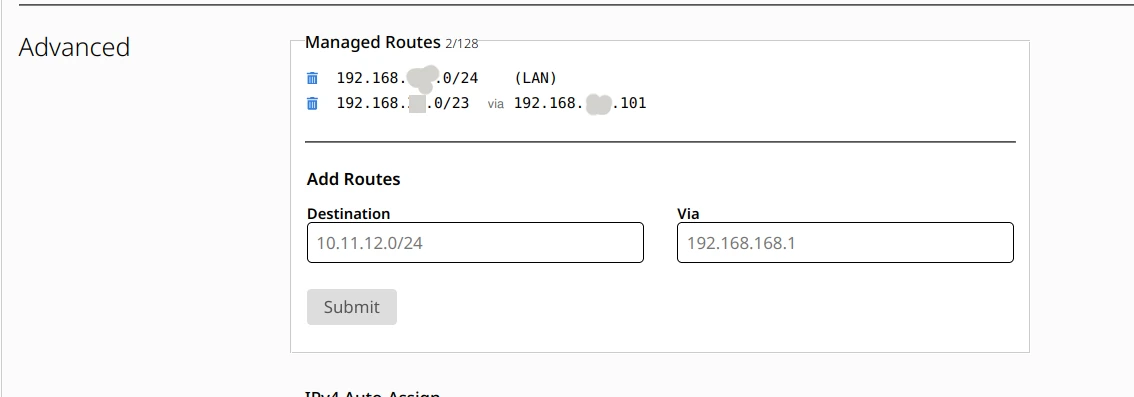
On the Linux machine itself the route may not show up: it already has that LAN connected and that route wins. You check it from the phone.
Forwarding and masquerading
sudo sysctl -w net.ipv4.ip_forward=1
sudo iptables -t nat -I POSTROUTING -s 10.147.20.0/24 -o eth0 -j MASQUERADE
sudo iptables -I FORWARD -i zt+ -o eth0 -s 10.147.20.0/24 -j ACCEPT
sudo iptables -I FORWARD -i eth0 -o zt+ -m state --state RELATED,ESTABLISHED -j ACCEPT
Warning: on recent distributions — Debian 13, the current Raspberry Pi OS — the stock firewall is nftables and the
iptablespackage may not be installed, in which case these commands fail as soon as they're copied and pasted. If that happens, install it with your distribution's package manager before going on. I haven't checked it on a freshly installed machine, so take it as a warning and not as a certainty.
- The first one turns on forwarding: without it the machine doesn't move packets between interfaces.
- The second one masquerades: what goes out to the LAN from the ZeroTier subnet carries the machine's own address.
- The third and the fourth open the way in both directions: from the virtual boat to the LAN only from that subnet, and back only the answers of conversations already open.
They go with -I (at the head) and not with -A: on a machine with Docker the FORWARD chain is on DROP and a rule at the end never applies. Nor do they survive a reboot: on the boat a systemd unit puts them back at startup, after ZeroTier. That's the piece still missing for everything to be standing the next day, and you have it whole in the appendix at the end.
5. The MTU trap
ZeroTier runs at 2800 by default and a normal LAN at 1500. The Linux machine receives a 2800 packet and forwards it, but the LAN can't carry it: it's silently dropped.
The symptom looks like a random failure: ping answers and the router's front page loads, but a file stops halfway, an SSH session freezes when listing a big folder, the panel chart sits there thinking. After a while it comes back. It isn't the service or the wifi: it's the large transfers.
You fix it by trimming the maximum size on the way out to the LAN:
sudo iptables -t mangle -I FORWARD -o eth0 -p tcp --tcp-flags SYN,RST SYN -j TCPMSS --clamp-mss-to-pmtuWhen each TCP connection opens, the two ends agree on the maximum segment size; this rule rewrites that agreement on what goes out to the LAN so that it fits in 1500. Measured on the boat: the client announced 2740 and it went out at 1460. It's the line missing from almost every tutorial and the one that turns a network that "sometimes works" into one that works.
6. The limits, no frills
It doesn't carry broadcast or multicast. On this network there's no broadcast, so out go .local names — IP addresses are used — and out goes automatic discovery: the program that looks for printers or cameras doesn't find them. To query the router by its IP, it doesn't matter.
From the LAN you can't start connections towards ZeroTier. The monitor can't call the phone; the other way round it can, which is what's needed.
Masquerading hides the origin. In the router logs, accesses from ZeroTier show up with the Linux machine's address: it's worth knowing before hunting for an intruder who is you.
7. If your account is one of the new ones
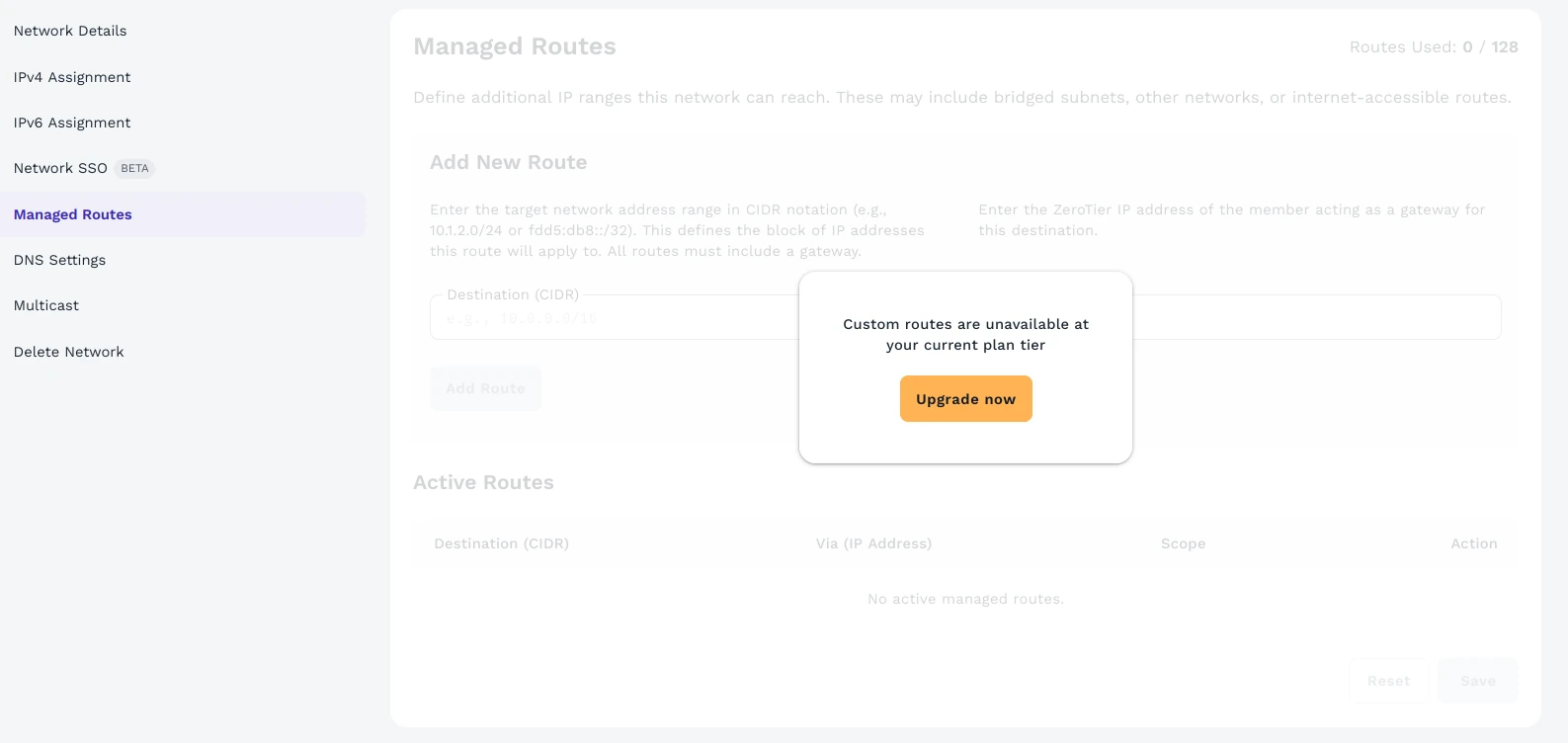
Since November 2025 there are two consoles. The old one, my.zerotier.com, is the one for accounts from before that date: it keeps its allowance — 25 devices in most cases — and allows managed routes for free. The new one, central.zerotier.com, is the one for new sign-ups: Personal plan free with 10 devices, one network and one administrator, and without managed routes. The machine doesn't know which console its network lives in.
If you signed up recently, the route from section 4 can't be set on the free plan: the screen is there, but disabled. You have to move up to a paid plan — Essential, $18/month, as a reference —; I'm not claiming which is the exact minimum: the price table and the forums don't say the same thing.
Nor is there automatic migration: new network, new identifier, every machine joined and authorised again, and routes, DNS and rules redone. The old account's allowance doesn't travel.
8. Closing
With this I have the router, the battery monitor and the engine Raspberry on my phone: looking at the batteries without going down to the engine room, seeing who's connected, peeking at the engine. Music too, the kind that lives on the boat and not in an internet playlist: the tablet with the Tempo app pulls from the on-board machine's Navidrome, and at anchor about ten kilometres away it plays without trouble. It isn't magic: two pieces and an MTU rule almost nobody mentions.
If one day this changes, there's a plan B: Tailscale does the same with a subnet router — a machine that announces the subnet —, on its free plan and on Android without root; it's also layer 3, so it doesn't carry broadcast or multicast either. And Headscale is a control plane of your own, installable on a server. Meanwhile, what's there works without touching the boat's router.
The account, the Linux client and the phone app are in the first part; what's here starts where that one fell short.
Appendix: rules surviving a reboot
iptables rules live in memory: switch the machine off and they're gone, and they don't come back on their own. The symptom is misleading, because there's no error at all: the route stops working and it looks as if ZeroTier has broken.
So it doesn't depend on someone remembering the four commands, they go in two files: a script that sets them and a systemd unit that runs it at startup.
The script
#!/bin/bash
# Puts back the rules for the ZeroTier -> boat LAN route.
# It's idempotent: if the rule is already there, it doesn't duplicate it.
set -u

ZT=10.147.20.0/24      # ZeroTier network subnet
LAN_IF=eth0            # boat LAN interface (check with: ip -br addr)
IPT=/usr/sbin/iptables

# add <table> <chain> <rule...>: inserts only if it isn't there already.
add() {
    local t=$1 c=$2; shift 2
    "$IPT" -t "$t" -C "$c" "$@" 2>/dev/null || "$IPT" -t "$t" -I "$c" "$@"
}

add nat    POSTROUTING -s "$ZT" -o "$LAN_IF" -j MASQUERADE
add filter FORWARD     -i zt+ -o "$LAN_IF" -s "$ZT" -j ACCEPT
add filter FORWARD     -i "$LAN_IF" -o zt+ -m state --state RELATED,ESTABLISHED -j ACCEPT
add mangle FORWARD     -o "$LAN_IF" -p tcp --tcp-flags SYN,RST SYN -j TCPMSS --clamp-mss-to-pmtu
Save it as zerotier-lan-forward.sh. It checks with -C before inserting with -I, so you can run it as many times as you like without filling the table with repeated rules. The last line is the MSS clamp from the MTU section: without it, the same setup hangs on large downloads.
The unit
[Unit]
Description=ZeroTier route to the boat LAN
After=network-online.target zerotier-one.service
Wants=network-online.target

[Service]
Type=oneshot
RemainAfterExit=yes
ExecStart=/usr/local/sbin/zerotier-lan-forward.sh
ExecStop=-/usr/sbin/iptables -t mangle -D FORWARD -o eth0 -p tcp --tcp-flags SYN,RST SYN -j TCPMSS --clamp-mss-to-pmtu
ExecStop=-/usr/sbin/iptables -D FORWARD -i eth0 -o zt+ -m state --state RELATED,ESTABLISHED -j ACCEPT
ExecStop=-/usr/sbin/iptables -D FORWARD -i zt+ -o eth0 -s 10.147.20.0/24 -j ACCEPT
ExecStop=-/usr/sbin/iptables -t nat -D POSTROUTING -s 10.147.20.0/24 -o eth0 -j MASQUERADE

[Install]
WantedBy=multi-user.target
Save it as zerotier-lan-forward.service. oneshot with RemainAfterExit=yes means "run this once and consider it done": no process is left running. After= waits for ZeroTier to be up, because before that the zt… interface doesn't exist and there's nowhere to put the rules. The ExecStop lines undo exactly what was done, so stopping the unit leaves the machine as it was.
You don't need to know systemd for this: it's three files and three commands.
Kernel forwarding
For packets to pass from one interface to another, the kernel has to be told. If the machine doesn't have forwarding enabled, the four rules are in place and still nothing happens: no error message, no clue. Some have it enabled for another reason — Docker, for instance, sets it at boot —, but that's a side effect and it can change with an update: better to declare it.
# /etc/sysctl.d/99-zerotier-lan-forward.conf
net.ipv4.ip_forward = 1
Save it as 99-zerotier-lan-forward.conf and apply it:
sudo install -m 644 99-zerotier-lan-forward.conf /etc/sysctl.d/
sudo sysctl --system
And check it: sysctl net.ipv4.ip_forward has to return net.ipv4.ip_forward = 1.
That makes three files: the script, the unit and this one. The other two are installed and started in the next section.
Getting it going
With both files saved in the working directory:
sudo install -m 755 zerotier-lan-forward.sh      /usr/local/sbin/
sudo install -m 644 zerotier-lan-forward.service /etc/systemd/system/
sudo systemctl daemon-reload
sudo systemctl enable --now zerotier-lan-forward.service
Checking it
systemctl status zerotier-lan-forward.service has to say active (exited). The four rules show up like this:
sudo iptables -t nat -S POSTROUTING
sudo iptables -S FORWARD
sudo iptables -t mangle -S FORWARD
But the real test is null of those: it's rebooting the machine and getting in again from outside.
The official reference for the unit is freedesktop's, in English: systemd.service.